We maintain electronic notebooks (ELNs) in the lab. Your Box Account contains a directory with templates to help you get started. The guidance below outlines our standardized system for efficient data retrieval, ensuring reproducibility and traceable records. If you prefer to keep a different format, please coordinate with Dr. McManus.
Notebook Template: A granular example format can be downloaded here.
Each entry must be stored within its own directory, labeled by experiment number. Subdirectories should contain raw data files. Do not maintain a single document for all experiments. Your Box account contains a pre-organized hierarchical structure to assist you.
Because Box is a managed, access-controlled system providing file version history, modification timestamps, robust backups, and audit capabilities, it satisfies standard "audit trail + retention + integrity" expectations for ELN-style records. For these reasons, UCSF has approved our use of standard text documents within Box as our official ELN.
- Chronological Records & Storage Conventions
A simple chronological record for each experiment must be kept following UC directed guidelines. To facilitate data tracing, apply the following conventions:
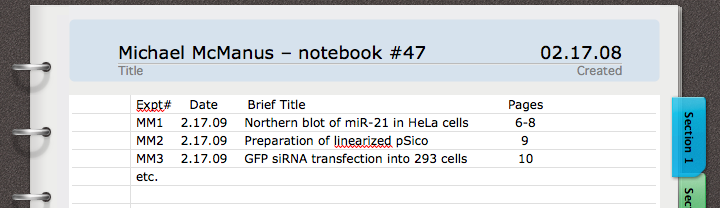
- Index (Table of Contents): Your eNotebook directory must contain an index log detailing the experiment number, title, and date. Update this log concurrently as data is entered.
- Experiment Identifier: Each experiment must be assigned a globally unique identifier consisting of your initials followed by a sequential number (e.g., MM24, MM25). This identifier is never reused, even if an experiment is canceled or repeated. All raw data, analysis outputs, samples, tubes, and reagents must be labeled with this code.
Example Workflow: Labeling becomes faster and samples remain organized when tied directly to the code. For instance: "MM52 gDNA was amplified using the PCR conditions established in MM41". Tubes in the freezer instantly map back to the exact dataset in Box.- Short Title: Provide a concise, descriptive title at the top of the entry page to identify the nature of the experiment (e.g., "Cloning the hPGK promoter into pSico-mCherry").
- Date & Purpose: Enter the start date and sign the page. Include a brief description (1–2 sentences) explaining the PURPOSE of the experiment.
- Materials & Methods: Outline the protocol. For standard techniques (e.g., FACS, SDS-PAGE, restriction mapping), state the method, condition variables, or reference a standard operating procedure (SOP) in your Lab Protocols directory. If a method is novel or significantly modified, describe it in comprehensive detail so another investigator can perfectly replicate it.
- Raw Experimental Data: Whenever possible, embed raw results directly into the eNotebook document (e.g., an image of an EtBr-stained agarose gel). For exceptionally large datasets, such as deep sequencing troves, store the files on our Centaurus or Petabyte lab servers and explicitly cross-reference the exact file path within the notebook entry.
- Results, Conclusions & Next Steps: Explicitly state the outcome. Summarize whether the experiment succeeded and document the major finding (e.g., "7 positive CD45(+) 293 lines identified"). Always conclude with a NEXT STEPS section to help readers easily trace the logical progression of your project.
- Multi-Tasking and Page Separation
When handling multiple experiments in a single day (e.g., running a FACS screen, mapping a plasmid, and running a Northern blot simultaneously), separate them cleanly. Dedicate an entirely new document entry/page to each distinct experiment number (e.g., MM48, MM49, and MM50).
- Table of Contents Format
Maintain a clean, consistent index table at the front of your notebook directory matching the unified format illustrated below:
Institutional Compliance Notice
Please note that your laboratory notebook is not personal property, nor does it belong exclusively to the lab—it is the legal property of the Regents of the University of California. Notebooks must remain securely stored and should never be taken off campus without explicit permission. University legal counsel may audit these records at any time to validate patent claims or verify ethical research practices. Take your documentation obligations seriously.